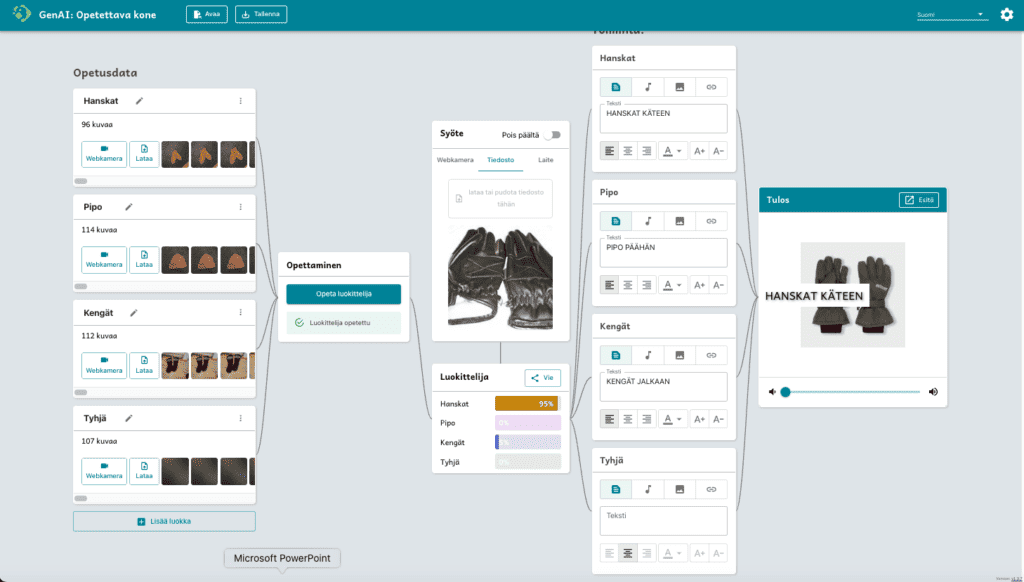
Objectives and key concepts
Understanding AI
The aim of this material is to help students understand how AI and machine learning are used in applications and how AI is reflected in their everyday lives.
Exploiting the design process
Support students to use the design process in their project work
Making the most of technology
Support students’ ability to harness technology for productive use
- What is AI?
- Identify how AI is manifesting itself in everyday life and what its impact is
- Explore the four key concepts of machine learning: training data, classifier, certainty and fragility
- Practise using the GenAI teaching machine
Key concepts:
- AI, machine learning, data, educational data, application, classifier, class, certainty and fragility
Accessories:
- Computer or tablet per group or pair of pupils
- AI in my life material distributed to students either electronically(word doc) or in print(pdf) as a handout
- Teachable machine app (https://tm.generation-ai-stn.fi)
Mission: what is artificial intelligence?
Working method: teacher-led discussion after watching the video.
AI is involved in our everyday lives in many ways. AI, as part of familiar applications, helps us find information, offers us route options, helps us stay in touch with friends and recommends news, music or movies that might interest us.
Watch the video
- Watch the video “What is AI?”
Discussion (teacher leads)
- What does AI need to learn?
- What is data?
- What does a classifier do?
If you find the questions difficult, you can watch the video again (the video is segmented, so you can easily watch only a specific part).
Task: how does AI affect my everyday life?
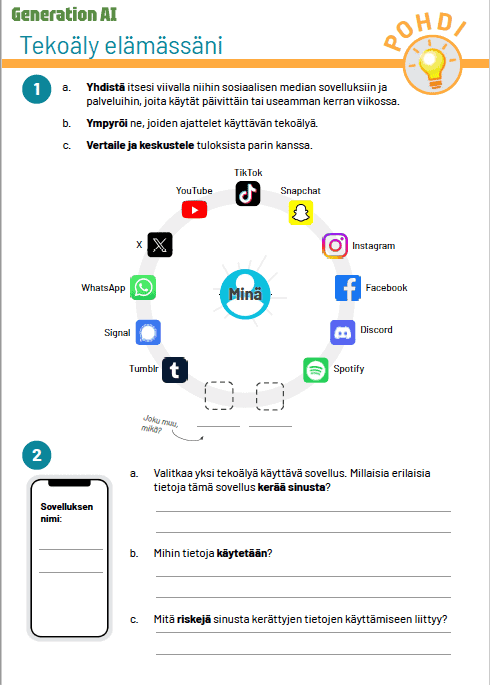
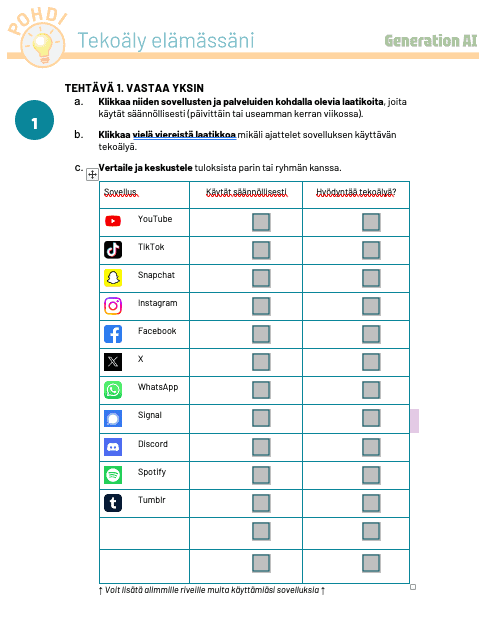
This task is divided into three sections, using the “AI in my life” task sheet (distributed by the teacher to the students either electronically or as a printout)
Analyse what kind of apps you use in your everyday life (task 1 in the material)
Working method: the pupil completes point 1 of the form independently, after which his/her answers are compared with other members of the pair or group.
Task 1 of the questionnaire asks which commonly known social media applications the student uses and which of them, according to his/her interpretation, use AI.
Discuss what kind of information applications collect about their users (Activity 2 in the material)
Working method: a pair or group completes task 2 together.
At this stage, the pair or group should choose one of the social apps in the task sheet and reflect on its function according to the instructions in the sheet.
This exercise will help you understand what kind of information everyday applications collect about their users. The aim is to connect the key concept of AI, educational data, to the students’ experience.
Teacher-led discussion debriefing
Working method: teacher-led discussion
In this teacher-led exercise, groups present their findings from the previous exercise to the others. Under the guidance of a teacher, we will go through how different data traces (e.g. races, likes and comments) generate information that AI systems use in their work.
The students are asked to discuss how to classify users into different categories, such as gamers, horse riders or skateboarders, based on the data traces they leave behind.
In this way, the second important concept in this teaching package, the classifier, is introduced for the first time and linked to the students’ own experiences.
Task: see how the machine you are teaching (AI) works?
How to work: the teacher shows the attached video to the students.
The Teachable Machine is an application that is an easy-to-use tool for creating image classifiers. In the video below, an expert from Code School Finland illustrates by creating a simple animal classifier where the AI was taught to identify a cat, dog and rabbit from the images presented to it.
In practice, he uses the video to illustrate how images of animals form the basis of classification (training data), how confidently the machine identified animals (confidence) and in which situations the classifier failed and how small changes in the environment can undermine the classifier’s performance (fragility).
Task: let’s try how the classifier works!
Working method: students work in small groups to create their own classifier
Above, we showed how the classifier, the machine to be taught, works. Now it’s your turn to teach the machine to classify pictures!
Do this exercise in small groups. You can teach the machine to classify things that interest you. They can be, for example, image, object, facial expression or posture recognisers.
NOTE! It is very important to remember to save work in progress! The student’s work is saved as a .zip file on the device used. Remember to transfer the .zip files if you use e.g. loan machines!