Lesson objectives
- Ideate, design and implement your own classifier application using a teaching machine
- Deepen your understanding of key concepts and methods in machine learning
- Support students’ creative skills, participation and agency in collaborative project work
Key concepts
- AI, machine learning, data, educational data, application, classifier, class, certainty, fragility
Accessories:
- Computer/tablet per group
- Computer application to be taught: https://tm.generation-ai-stn.fi
- Design and development to be done as a printout (pdf) or as an editable word doc file. Example response as a word file.
How to work:
- Small group or pair work
Task: be inspired by examples and take a leaf out of the book!
Working method: work in small groups or pairs
Last time, you got to know the machine you were teaching and made a simple classifier. This time we start with a project to make a classifier that solves a practical problem or challenge. But before that, it’s time to look at some examples.
Your task is to get to know four different classifiers. If you don’t have much time available, please just watch the videos. If you have more time available to explore the examples, you can also open them on your computer or mobile device. See below for the different options.
- Watch the videos. The videos explain how each classifier example works (this is a compulsory task, points 2-4 are additional tasks).
- Start and investigate. This allows you to try out the sample classifier yourself and modify it as you wish. Note! your environment is foreign, so the machine may not work properly (it is fragile) – you can fix this by editing the tutorial data.
- Save the classifier on your computer (download the .zip file). The file can be opened later on an empty teaching machine with the “open” function.
- Read the QR code on your phone or tablet (tap to enlarge it first) and test how the classifier works on your phone!
Example: tree detector
Is the tree pine, spruce or birch? The tree identifier has been trained to identify these three species. The classifier plays a short video after identifying the tree.

Example: clothes in words
Glove, hat or shoes? Or nothing? In this simple example, the voice tells you what to do with each outfit. For example. when the classifier recognises the hat, the application says “hat on”

Example: emotion detector
Are you sad, happy, angry or neutral? The smiley says it all! This classifier has been trained to recognise emotions with different facial expressions. When the machine recognises the expression, it responds with a smiley.

Example: angry hand
Can a hand be angry? Or rather, it is a figure represented by a hand – when the classifier recognises the hand as a “mouth” it plays a hissing sound. When the hand is in the fist, the grader repeats the sound of satisfaction.

Task: in small groups, design and implement your own classifier
Working method: in pairs or small groups
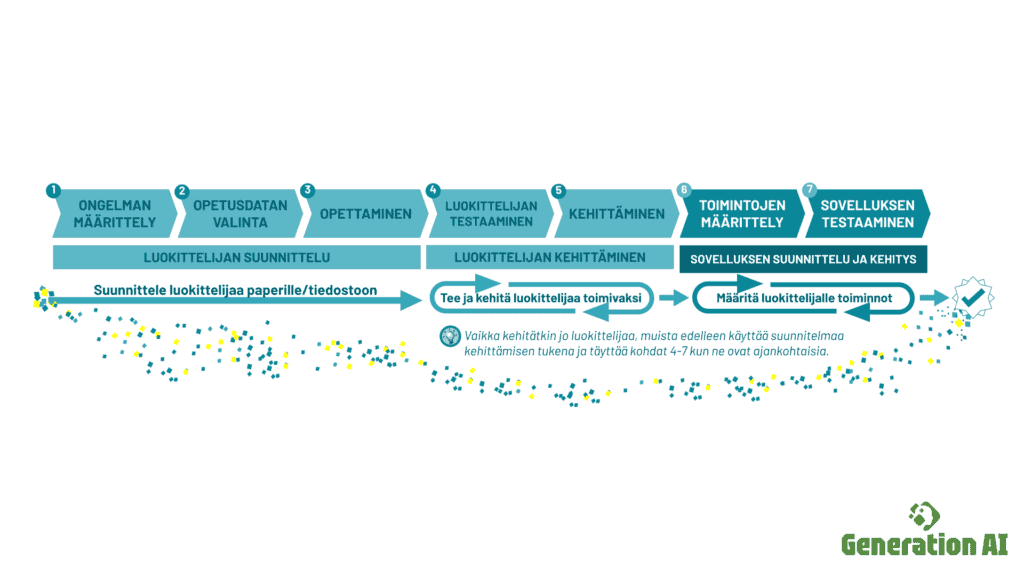
It is important that you use the task sheet* to support your work. It contains guiding questions to facilitate your work and guides you to record the progress of the design process and to record observations of the classifier’s work.
*If you don’t have the exercise form, you can get it here: print (pdf) or edit word doc. Example response as a word file.
Getting started
Start the task by discussing the example videos! What kind of classifiers were they? How do they work? What could a group’s own classifier look like? The aim is to choose an idea through a joint discussion, which the group then develops together.
Present your group’s idea to the teacher, who will assess whether it can be implemented on the teaching machine with an application.
Classifier design (steps 1-3)
Once the teacher has approved the idea, the application can be designed in more detail.
Note! Planning should NOT be done without a task sheet, which the teacher distributes to the students either electronically or as a printout (links at the top of this page).
The questionnaire asks, for example. What problem does your classifier solve? What kind of educational data do you need to teach AI? Follow and answer the questions on the task sheet while using the machine to be taught application (press the button if the machine is not yet running)
ps. Remember to save your work ( save button on the machine you are teaching on). The work is saved on the device you are using. Move it to another location before returning your laptop or tablet.
Developing and testing the classifier (steps 4-5)
At this stage, the application is being tested and developed. As a group, discuss the functionality of the app, e.g. the relationship between the educational data and the performance of the model taught. Could the type of educational data created explain how the machine works? Keep improving the machine until you think it works well enough.
Remember to fill in the task sheet and answer its questions when developing your classifier!
App design and development
The application is the part of the machine being taught, where you plan what the machine will do when it detects, for example. cat (animal classifier). Does the machine sleep? Will it have a picture of a cat? Should it say cat?
Does the app do what you want it to do? Why or why not?
Remember to fill in the task sheet and answer its questions also when developing the app!!