Skip to content
  • Home page
  • Current affairs
  • Materials
  • What we do?
    • For the teacher
    • For the researcher
    • For the public
  • Consortium
  • Contact
Generation AI
    • wpml-ls-flag
    • wpml-ls-flag
    • wpml-ls-flag
Generation AI
  • Home page
  • Current affairs
  • Materials
  • What we do?
    • For the teacher
    • For the researcher
    • For the public
  • Consortium
  • Contact
[gtranslate]

Testi

View Categories
  • Koti
  • Materiaalit
  • Somekone-social-media-emulator
  • Teaching materials
  • Teaching materials of Somekone emulator
  • Social media and artificial intelligence
  • Lessons 1-2: basics and profiling game

Lessons 1-2: basics and profiling game

Arvioitu lukuaika tai opetukseen kuluva aika: 3 minuuttia

Teacher, make these preparations

  • Today we play a profiling game. It can be played alone or in pairs. It is recommended that you divide your students into pairs at this stage, as the soma machine will be used in pairs later on.
  • Each player (one student or a pair) must have a phone, tablet or computer and a suitable network connection.
  • Profiling gameThere are tasks before and after. Distribute the task sheets to the students either on paper or use e.g. Google Classroom / M365 Teams.
  • Follow the instructions and you’ll be fine!

See the help page for instructions on how to use the profiling game!

Profiling game is a simple application. However, it is worth looking at the instructions before using the application.

Let’s get started!

In the video below, Jussi Koivisto explains three key concepts in social media: a) data b) profile and c) referrer. This tutorial material deals with these concepts in different ways from start to finish.

Teacher, show the introductory video at this point


The role of pupils


Recall the video you watched a while ago

What did Jussi say about advertising targeting? He had an example of an online store towards the end of the video

Study task sheet 1

Study the “draw conclusions from the data” exercises on the task sheet and think about what you would answer to the questions

Complete task form 1

Complete both tasks in task sheet 1 “draw conclusions from the data”

Let’s play a profiling game!

Teacher, introduce the profiling game with a video

Now it’s time to solve the mystery of the mystery person! Are the players ready?

Teacher, start the profiling game
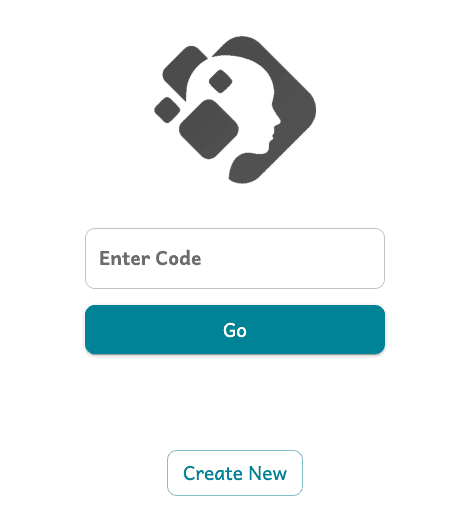
https://classroom.gen-ai.fi
A screen similar to the one shown in the picture will appear. Create a new game event by pressing “create new”
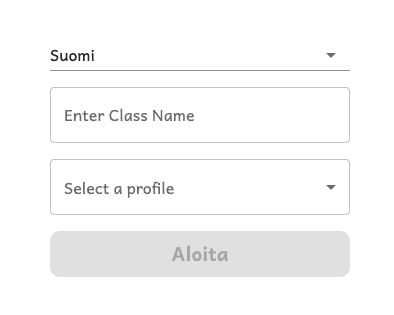
Enter the name of your class “e.g. Keke’s third class” and select the only profile available from the profile menu. Press start!

The role of pupils


Open the profiling game on your device

Read the QR code or enter the code at https://classroom.gen-ai.fi

Give the player a name

In the box that opens, enter the name of the player

Wait for the teacher to start the game

When all players are present in the profile game, the teacher starts the game

Teacher, start the game when the students are present
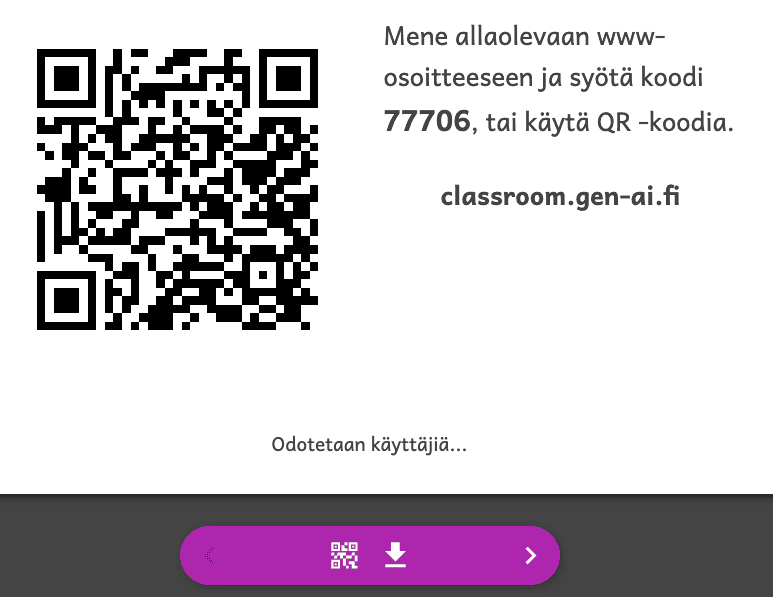
When all students are present, press the arrow on the right-hand side of the bottom bar to start the game. You can move between clues by using the arrow

NOTE! the QR code and code in the picture are not in use! They are examples!

No! How did the profiling go? Were you able to find out what the mystery person is like?

“Oikea vastaus”

Profile of Mystery Person

  • Age: approx. 15 years
  • Place of residence: Tampere
  • Interests: gaming, skateboarding, hockey
  • Other: go skateboarding three times a week, and walk the dog on weekends

Profiling and social media

Reflect on your own social media use? What kind of data footprints are you creating?


The role of pupils


Think about how you use social media

What kind of data is generated about you when you use social media?

Study task sheet 2

Study the questions in worksheet 2 “Data in social media”

Please answer the questions in worksheet 2

Please answer each question on the task sheet.

Thank you for this lesson!

Today we practiced profiling without the help of AI and IT. Next time, we’ll do it all automatically with the help of a soma machine!

Updated on 12.2.2025
data profile recommendations somekone somekone video

Mitä mieltä olet tästä sivusta?

  • Happy
  • Normal
  • Sad

Jaa tämä sivu

  • Facebook
  • X
  • LinkedIn
  • Pinterest
Lesson 5: The impact of social mediaLessons 3-4: how does social media work?

Powered by BetterDocs

  • Welcome to the Generation AI project website!
  • Current affairs
  • Materials
  • What we do?koe
  • Consortium

© 2026 Generation AI - WordPress Theme by Kadence WP

  • Saavutettavuusseloste
  • Tietosuojaseloste
Generation AI
Hallinnoi suostumusta
Parhaan kokemuksen tarjoamiseksi käytämme teknologioita, kuten evästeitä, tallentaaksemme ja/tai käyttääksemme laitetietoja. Näiden tekniikoiden hyväksyminen antaa meille mahdollisuuden käsitellä tietoja, kuten selauskäyttäytymistä tai yksilöllisiä tunnuksia tällä sivustolla. Suostumuksen jättäminen tai peruuttaminen voi vaikuttaa haitallisesti tiettyihin ominaisuuksiin ja toimintoihin.
Toiminnalliset Always active
Tekninen tallennus tai pääsy on ehdottoman välttämätön oikeutettua tarkoitusta varten, joka mahdollistaa tietyn tilaajan tai käyttäjän nimenomaisesti pyytämän palvelun käytön, tai yksinomaan viestinnän välittämiseksi sähköisen viestintäverkon kautta.
Asetukset
Tekninen tallennus tai pääsy on tarpeen laillisessa tarkoituksessa sellaisten asetusten tallentamiseen, joita tilaaja tai käyttäjä ei ole pyytänyt.
Tilastot
Tekninen tallennus tai pääsy, jota käytetään yksinomaan tilastollisiin tarkoituksiin. Tekninen tallennus tai pääsy, jota käytetään yksinomaan anonyymeihin tilastollisiin tarkoituksiin. Ilman haastetta, Internet-palveluntarjoajasi vapaaehtoista suostumusta tai kolmannen osapuolen lisätietueita pelkästään tähän tarkoitukseen tallennettuja tai haettuja tietoja ei yleensä voida käyttää tunnistamaan sinua.
Markkinointi
Teknistä tallennustilaa tai pääsyä tarvitaan käyttäjäprofiilien luomiseen mainosten lähettämistä varten tai käyttäjän seuraamiseksi verkkosivustolla tai useilla verkkosivustoilla vastaavia markkinointitarkoituksia varten.
  • Manage options
  • Manage services
  • Manage {vendor_count} vendors
  • Read more about these purposes
Näytä asetukset
  • {title}
  • {title}
  • {title}
Scroll to top
  • Suomi (Finnish)
  • Svenska (Swedish)
  • English